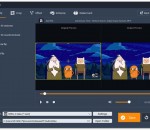
Movavi Slideshow Maker is a great tool to turn your photo collection into a spectacular movie. Compile a slideshow automatically with Slideshow Wizard or explore the creative tools to make the movie yourself: Add, rotate, crop, and flip images on the timeline Insert filters, transitions, titles, and callouts Sync slides duration with the music Enhance video quality Save slideshows in any format, upload the results to YouTube.
DVDStyler Portable is the popular DVDStyler program packaged with a PortableApps.com Launcher as a portable app, so you can take your DVD creation tool settings with you. It has all the same great features as DVDStyler. Plus, it leaves no personal information behind on the machine you run it on, so you can take your favorite DVD menu creation program with you wherever you go.
Enjoying multimedia content on your computer, such as movies, can be a pleasant way to spend your free time. However, sometimes you might encounter some difficulties, such as differences between the names of your video and subtitle files. If you find yourself in this situation, you can consider turning to third-party software, such as PSA Media & Subtitle Renamer, since it might save you significant amounts of time.
LASTAR is a batch (non-interactive) audio processor allowing, in a few clics, loudness adjustement and file splitting of a batch of audio recordings, using audio transparent maximizer. At the opposite of usual available softwares, loudness normalisation is done on signal power, which leads to a louder and more homogeneous result than a usual "peak" normalisation, in particular on live recordings.
FCBBooster is a software tool to boost the Behringer FCB 1010 MIDI foot controller. It acts as an interface between the FCB 1010 and whatever MIDI device, hardware or software, you want to control with it, augmenting the controller's capabilities and simplifying its use at once.
myFFmpeg is a graphical front-end for FFmpeg, a command-line tool used to convert multimedia files between formats. The command line instructions can be very hard to master/understand, so iFFmpeg does all the hard work for you. This allows you to use FFmpeg without detailed command-line knowledge.
DVDFab CinaviaRemoval HD is the world first high quality solution for removing the Cinavia watermark from audio tracks of a disc, thus removing the protection altogether. It works by repairing the audio track, taking it back to original Master in terms of sound quality. The entire process is automatically done and the audio quality is lossless in the Copy module, and next only to the original in the Ripper module.
iOrgsoft DVD Maker is a great tool to burn almost all videos to DVD on Windows (Windows 8 included). Various DVD menu templates, capable of adding local music, picture as background, all these help make DVD impressive and stylish. That means, you can burn your home videos into DVDs with your own photos and your favorite background music like no others.
PSP Squad is a collection of VST plug-ins that is designed to help you control the sound output by using a equalizer interface. You have access to six different equalizers that are inspired by the interface of some classic models but with enhanced features.
DVDFab All-In-One is the all-in-one software discount package for copying Blu-ray/DVD and converting video. It consists of several feature options: DVD Copy, DVD Ripper, Blu-ray Copy, Blu-ray Ripper, Blu-ray to DVD Converter, DVD to Blu-ray Converter, DVD Creator, CinaviaRemoval HD, Blu-ray Creator, Video Converter, and File Transfer, all in one convenient and easy to customize user interface. Really a powerful and amazing package!
DvbSub2Text program takes as input a MPEG Transport stream. It searches for bitmap subtitles and converts them to SubRip text format (srt). Pixel based subtitles are converted to a text with the help of Tesseract OCR engine 3.0.
GOM Media Player только media player вам нужно - бесплатно! Не только GOM Media Player бесплатно видео плеер, с его встроенной поддержкой для всех наиболее популярных видео и медиа-проигрыватель форматов, тонн передовых функций, крайней настраиваемость, и службу Поиск кодека, GOM Media Player обязательно для выполнения всех ваших потребностей воспроизведения. Миллионы пользователей в сотнях стран GOM Media Player является одним из самых популярных видео игроков в мире. Что нового: «Touch добавленный» функция для устройств с сенсорным экраном. Добавлена функция «Окно поиска» на плейлист. (Ctrl + F) Поддерживается «HTTPS URL» для youtube или чистое радио воспроизведения. (Ctrl + U) Добавлено «Музыки коснитесь» предпочтения, связанные для воспроизведения музыкальных файлов. Повышение производительности, относящиеся к «скорость добавить & удалить» файлов на плейлист. Другие различные корректировки, исправления и изменения
RealPlayer всегда включено вам играть RealAudio (* .ra) и RealMedia (* .ram) файлов. Скачать видео с тысяч веб-сайтов с помощью только одного нажмите кнопку построить ваши собственные библиотеки видео и плейлисты играть все основные аудио и видео форматов поддержка Flash видео DVD, SVCD, VCD горения и видео записи RealPlayer для личного пользования включает аудио компакт-дисков возможностей, DVR-стиль воспроизведения буферизации, мультимедиа поиска, Интернет-радио, jukebox стиль файл библиотеки, встроенный веб-браузер, (с помощью Microsoft Internet Explorer)и возможность передачи средств массовой информации для ряда портативных устройств, в том числе Apple iPod, MP3-плееры и устройств Windows Media.
GOM является свободный медиа-проигрыватель с популярных аудио & видео кодеки встроенные. Кодек Finder GOM Player включает в себя много кодеков (XviD, DivX, FLV1, AC3, OGG, MP4, H263 и более) так что вам не нужно устанавливать кодеки отдельно для большинства видео. Для тех видео, которые требуют отдельного кодека GOM Player найдете один. Играть битые файлы AVI (запатентованная) GOM Player запатентованная технология позволяет пользователям просматривать файлы с поврежденным индексом или что еще загружаются. Мощные субтитров поддержка GOM Player поддерживает SMI, SRT, RT, SUB (с IDX) файлы субтитров. Вы можете синхронизировать видео и субтитров, даже если есть любое несоответствие. Удобный плейлист, если вы запустить видео файл и уже существует файл с похожим именем в каталоге, он будет автоматически добавлено в ваш плейлист. GOM Player имеет аналогичный формат воспроизведения M3U, PLS, ASX. Поддержка различных типов средств массовой информации вместе с различными средствами массовой информации формате например AVI, MPG, MPEG и DAT, GOM Player также поддерживает потоковое формат Windows media (WMV, ASF, ASX). Вы также можете посмотреть видео качества DVD с 5.1-канальный аудиовыход.